DAWperator streams bit-exact audio and syncs transport between DAWs running at the same time on your Mac — a native Apple Silicon way to get the job ReWire used to do.
Apple Silicon · macOS 11 or later · 14-day free trial · $30 once, no subscription
Audio UnitBit-exact audioMIDI Clock + MTC sync
Three steps
No cables, no drivers, no routing software.
1
Install
Run the installer and restart your DAWs. Look under the manufacturer L4Music in the plugin menu.
2
Send
In the DAW that makes the sound, put DAWperator Send on a track. Its audio is published on one of that DAW's 16 buses.
3
Receive
In the DAW that collects it, add DAWperator Receive, turn the DAW knob to the sender and pick the bus. Record or mix it like any track.
Built for real sessions
🎤
Bit-exact audio
At the same sample rate the audio arrives exactly as it left — every sample, in order. Tiny clock differences between DAWs are corrected automatically.
🔗
Many sources, one destination
Every DAW gets its own 16 buses, so two DAWs can both use “bus 1” without clashing. Load several Receives in one DAW, each listening to a different DAW.
⏱
Transport sync
Play, stop, tempo and position follow across DAWs using MIDI Clock and MIDI Time Code on a virtual port, DAWperator Transport. Loops and locates follow too.
💡
Know what’s happening
A stereo signal meter, buffer and latency readout, and a DAW list that greys out DAWs with no active Send — so you can see why something is silent.
⚡
Native and light
Apple Silicon Audio Units, lock-free shared memory, nothing running in the background. Signed and notarized by L4Music.
🔑
Fair licensing
14 days free, then one purchase covers 2 of your Macs for good. Free updates for the whole 1.x series.
A front panel you can read at a glance
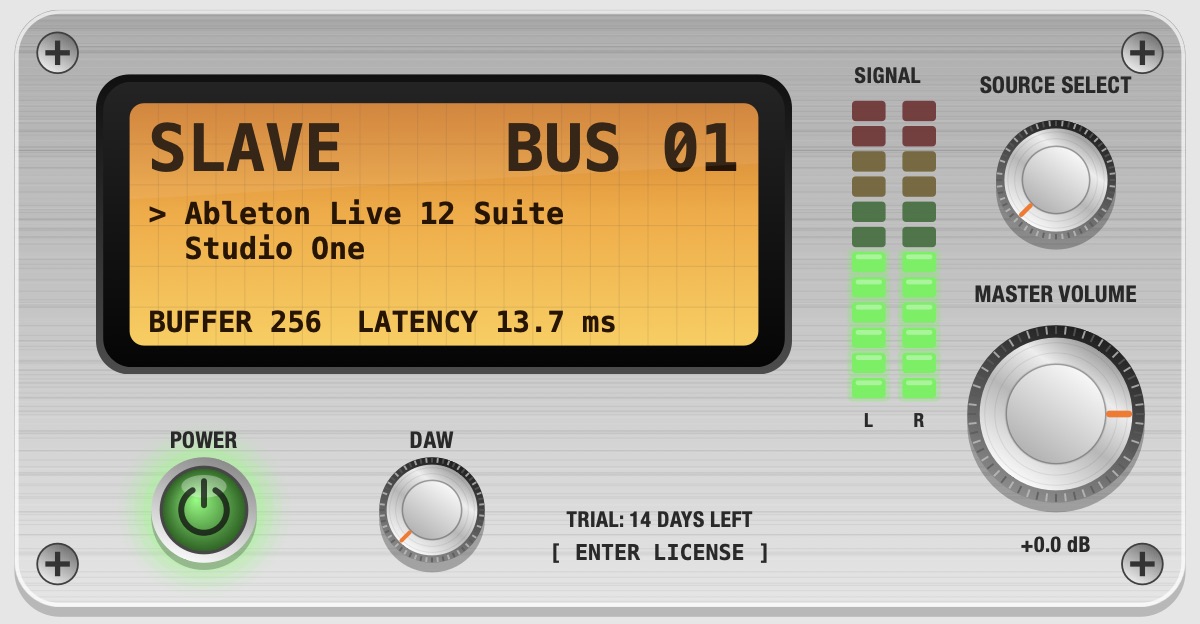
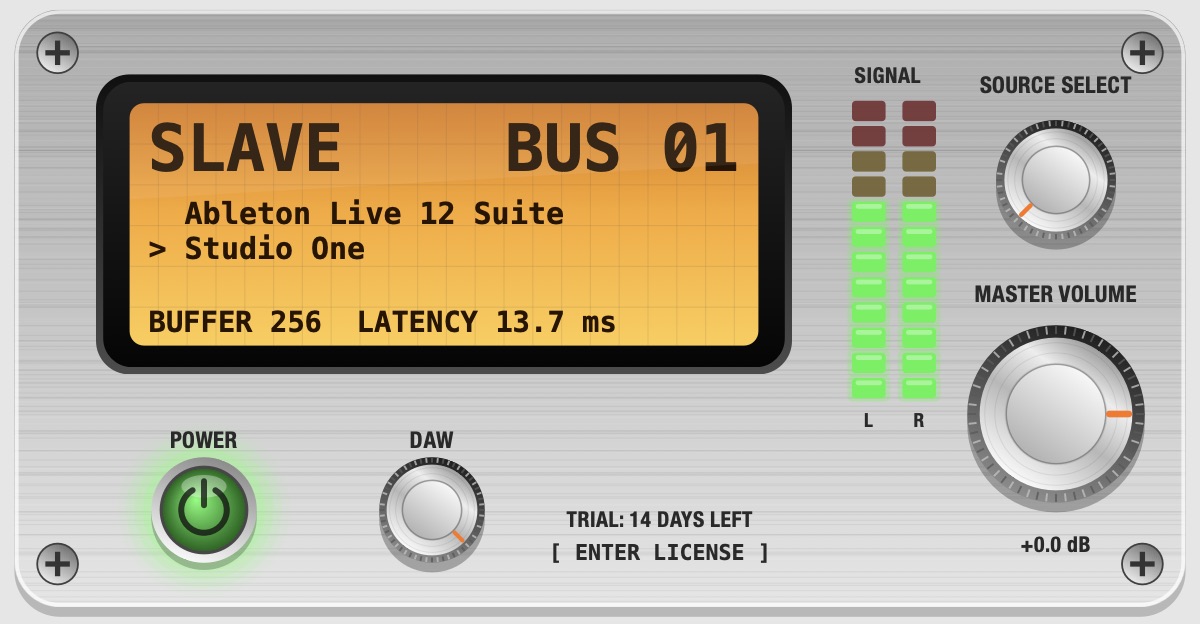
Pick the sending DAW and bus, watch the signal, trim the gain.
Receiving from Ableton Live on bus 1A second Receive in the same DAW, listening to Studio One
DAW knobChoose which DAW to listen to. DAWs with no Send running are greyed out.
Source selectStep through that DAW’s buses.
Signal meterSee the audio arriving, before the gain knob.
Master volumeGain from −60 to +12 dB. At 0 dB the audio is untouched.
Works with your DAWs
Ableton Live 12Fender Studio Pro 8Logic ProMPCPro Tools (Coming Soon)
Tested with Ableton Live 12 and Fender Studio Pro 8. DAWperator is a standard Audio Unit, so it is built for any macOS DAW that hosts Audio Units; the sending and receiving DAWs can be different apps. Apple Silicon only.
Simple pricing
One-time purchase. No subscription.
$30
One-time purchase · 2 Macs
All four plugins: DAWperator, Send, Receive, Transport
No. It does the same job — moving audio and transport between DAWs running side by side — but it is a new, native Apple Silicon plugin, not the original ReWire protocol (which was Intel-only and has been discontinued).
What do I need on each side?
In the sending DAW, DAWperator Send on a track. In the receiving DAW, DAWperator Receive on an instrument track. For transport sync, run DAWperator Transport (or the one-plugin DAWperator) in the DAW that leads, and set the other DAW to follow the DAWperator Transport MIDI port.
How much latency does it add?
About the combined buffer size of the two DAWs plus a few milliseconds of safety buffer (adjustable). The Receive panel shows the current figure. Use small buffers in both DAWs to keep it low.
Is the audio really identical?
Yes, when both DAWs run at the same sample rate: samples are copied exactly. If the clocks differ slightly, or the sample rates differ, DAWperator resamples gently to keep the streams locked, and that audio is no longer bit-for-bit identical.
Can two DAWs both feed one DAW?
Yes. Add one DAWperator Receive per source in the receiving DAW and point each at a different DAW. Each DAW has its own set of buses, so there are no clashes even if every Send stays on bus 1.
How does the trial and license work?
The first use starts a 14-day trial. After that, enter your license key (click ENTER LICENSE in any DAWperator window). One key activates 2 Macs, and you can deactivate a Mac to move the license. If you are offline, an activated license keeps working for 30 days.
Which Macs and macOS versions?
Apple Silicon Macs (M1 or later) on macOS 11 or later; tested on macOS 26 Tahoe. Intel Macs are not supported.
Try it free for 14 days
Download the installer, restart your DAWs, and look under L4Music.